For more Knowledge about technology and science visit... click here
Showing posts with label software. Show all posts

25 Best Cydia Apps

Cydia is a software application for iOS allowing the user to find and download applications and software packages that are compatible with jailbroken iPhones, iPod Touch or iPad. Cydia is developed by Jay Freeman well known as “Saurik”, you can choose a wide range of applications from the Cydia repository as most of them are free.

Here is a collection of few of those,
1. Wi-Fi Sync:
This enables synchronization of iTunes using Wi-Fi connectivity solutions. With these Wi-Fi connectivity solutions, you should be able to transfer files, games and folders, in ease from anywhere, in car, bed or shed. Wi-Fi synchronization once set sorts the problem and makes this synchronization automatic.
Download: Wi-Fi Sync
2. Infinifolders:
This is one of the newest tweak that is known as Infinifolders, which as the name suggests provides you with an infinite number of apps, and has the newly incorporate feature of vertical scrolling to browse through your folders. This is a very useful app for categorizing folders into categories and consolidate same category into a single big folder.
Download: Infinifolders
3. Overboard:
This is an overview of Springboards pages and jumps, which supports a number of WinterBoard themes, advanced customization with multi tasking accessibility for activating more than one task at a single moment and also now features an extended Springboard.
Download: Overboard
4. Safari Download Manager:
Safari download manager is one of the powerful extensions that add a powerful and highly configurable download manager, which is specially meant for iPhone’s web browser. This plug-in has the power to harness the maximum potential of pleasuresome browsing experience and network connectivity using your device.
Download: Safari Download Manager
5. Cydelete:
While you have been downloading a number of apps from Cydia following jailbreaking the device, sometimes you will find that some of the softwares are not friendly and you do not want them anymore, but will find that the process of deleting the apps takes seven steps before being erased, probably a punishment for jailbreaking. But this is no more an issue, that Cydelete is the one that can remove the installed apps by pressing on the app icon that you want to delete and press or tap the X alphabet, that you will be able to delete any app that is downloaded using Cydia only.
Download: Cydelete
6. Covert:
A new tweak from Chpwn, a developer has designed this tweak, which works like the incognito window of Google Chrome that which enables you to do private browsing on iPhone and iPod Touch when jailbroken and is installed via Cydia directly on being downloading the jailbreaking software. This comes with no cost and will not be remembering or allow the storage of history of web page URL, cookies, browsing sessions, passwords, cookies, cache and forms.
Download: Covert
7. Ipic my contacts:
This small app from Cydia following the jailbreaking of the iPhone or iPod Touch or iPad, will let you to display the contact picture next to the name of the contacts and also allows to perform instant search for placing a small icon next to the contact. All you have to do is no uploading business by merely clicking on the place where you want to place the new icon.
Download: Ipic my contacts
8. Facebreak:
With iPhone there has been the possibility of making FaceTime calls via Wi-Fi only, that you will find now that Facebreak is a tweak for jailbroken phones that will be enabled to make face time real-time calls using 3G as well. What is good about this software is that this tweak do not need any extra installation effort and comes along with Cydia while jailbreaking the iPhone.
Download: Facebreak
9. Mark read:
Well, you are sure to use this app on your jailbroken iPhone with Cydia, when you find yourself the emails turning out to undaunting to manage. Then there is a way that you will find yourself by using the Mark Read app with which you can mark all those emails that do not require any attention at all as read emails, and read only the important emails, instantly or later when convenient.
Download: Mark Read
10. Snap tap:
This app makes the best use of the volume control buttons to take a picture and was the one that was initially released. Now you have something that you can do more with this app like taking even videos using the volume control and headset buttons, capture images using the Cycorder or the built-in 3G cameras, mute shutter, taking self-portrait and normal usage when not taking picture or videos.
Download: Snap Tap
11. Nolock Screen:
This is one of the best apps that comes in real handy by disabling the “slide to unlock” feature and if you are not using the passcode or pending messages, then this will easily skip the lockscreen in no time for unlocking the phone. This tweak plays attractively with a small animation while doing this job.
Download: NoLock Screen
12. Mobile Volume Sound:
This is a tweak that can adds sounds by pressing the volume up or down buttons via your iPhone and works very well on versions from 3.0 onwards.
Download: Mobile Volume Sound
13. Locktopus:
This is a new application that can lock your individual applications with your password, making iPhone less vulnerable to document thefts and personal identity information release. This is being considered as one of the safest and most effective mode of application that can lack any apps that you use on your iPhone, enabling you to carry with your iPhone some confidential information in an easy manner.
Download: Locktopus
14. secretSMS:
Cydia has released an application using which you can send secret sms, which will not be available or known to anyone and can be read only by the intend user. This is a very professional and useful app but requires internet connection to use this app.
Download: secretSMS

15. Recent Delete:
This is an additional feature for the jailbroken iPhone using Cydia, which enables the mobile phone recent deletes extension, and individual calls could be deleted from the recent call lists. An advantage of this app is does not require installation or storage space, rather works as a plug-in.
Download: Recent Delete
16. Installous:
This being one of the top most applications that can be easily downloaded from Cydia and is capable of finding all applications that ends with *.ipa format in the iPhone, which in turn reveals many hidden secrets of the iPhone. This is a systematic installation that could be done better only on the iPhone, and so follow the link to get the necessary guidelines.
Download: Installous
17. Reminder:
Well when there are a number of apps to remind you on a task, I thought I will take the Remind Me Later as one of the reminder apps, which aids in putting your iPhone on snooze button for remind you on a later time, once in every 5 minutes until you complete the previous task and decide to move to the next task without missing. In short, adds snooze buttons to calendar reminders.
Download: Reminder

18. iProtect:
You can now protect your jailbroken iPhone with a password or by using a SIM control mechanism, with this small anti-theft system.
Download: iProtect
19. WinterBoard:
WinterBoard is an application for Graphic artists to create anything they want into themes for Apple OS, and also allows multiple downloading of theme packages by simply dragging them into the theme folders.
Download: WinterBoard
20. Signal:
This app is for managing the cell towers in your current location on a map and will allow you to choose the best that can provide maximum coverage and uninterrupted service.
Download: Signal
21. Folder Enhancer:
This remarkable app is made to open folders faster and can add up to nearly 320 icons and allows to create folders inside folders like a PC and also gives access to create folder while docking.
Download: Folder Enhancer
22. Enhanced tabs:
This app is made exclusively for Safari web browser to enhance the browsing experience with increased versatility.
Download: Enhanced tabs
23. Full Screen For Safari:
This is a powerful app with a number of features like a real multi touch browser, new gestures and actions making Safari a real intuitive and cool web browser for iPhone.
Download: Full Screen For Safari
24. qTweeter:
This is the fastest, coolest and most efficient way to tweet and work using your twitter account, and use in conjunction the Facebook account. There is much more that you can do with this app on both the prominent websites, Twitter and Facebook.
Download: qTweeter
25. Quick Reply:
This is an easy to use application to send quickly a reply to messages is a much easier and faster manner.
Download: Quick Reply
Comments are always appreciated!!
read more "25 Best Cydia Apps"

Get TV on Your PC for Free With AnyTV

This article helps us to Get TV on our PC for Free With AnyTV app. If you are not getting enough entertainment value out of your PC, then give this freebie a shot. The name is AnyTV 2.55. This piece of program brings thousands of streaming Internet TV & radio stations from around the Earth. Availability of channels can vary, in my case I couldn’t view many of the channels but what you get here is more than you would probably want. You can filter the content by a variety of categories (country, channel, genre, bit rate and so on), as well as save your own list of favorites.


Here’s how to get hundreds of free TV channels :
  1. Download the set up file from the link below. Go through the set up, and complete the installation.
  2. On the first run, you will be prompted to download a channel list. Click Yes and get started. This will take a minute or two. Click Close to view a long list of channels.
  3. Scrolling through the long list is boring, so you can just choose your country from the country list or click an appropriate icon above.
  4. Pick a channel, hit the play button and you are watching the channel before you know it.
Software Details
read more "Get TV on Your PC for Free With AnyTV"

5 Ways to Speed up your Website


Hmm, the title says it all. It is really important to keep your site good and healthy to attract new readers and to maintain the old readers as well. Healthy does not mean that you must give pizza and burger for it lol and it does not need them too. It is simple, make you site load faster. When you start a new site/blog the loading speed will be quite good since you will not have much stuffs on it but things change as the site/blog grow. When you add contents, images and videos it will affect the loading speed of your site/blog. What will you do if a site loads more than 20-30 seconds? Close it isn’t t? Well, that is not wrong because everyone does the same and even I. is there way to make a site/blog load in a rocket speed? Hmm well to be frank there is no such way is available but still you can reduce the loading speed of your site/blog. How? Simple, follow the ways given below,


1. Use a slash at the end of your links:


This is the most important thing that you must do and this is a best way to reduce the loading speed that I know. What is this? Hmm, I will explain. Stop reading this for a moment and look at the URL of this post. Do you find anything? Cool, go to the end of the URL now. Now got it? Still No? cool, see a backslash ‘/’ at the end of the URL. Yes, this is what I was speaking about. By adding a backslash ‘/’ at the end of the URL server will come to know that it is a directory that already exists thereby reducing the load time. If you do not add it then every time the server will look for the URL which increases the loading speed.

2. Reduce your JavaScript Codes:


This is the second thing you must do to optimize your blog’s loading speed. I am sure all of you will use loads of JavaScript Codes in you sites and that is not your fault as well. All the Software today uses JavaScript Code starting from Adsense, WordPress pluings and every other uses the same. When you load your site do not forget to take a look at the status bar of your browser because it will show how many sites it is connecting before loading your site. So try to keep your JS code as less possible. If you still want to use the JS codes then optimize it by crunching it. Not sure how to crunch? Hit here: http://www.brainjar.com/js/crunch/

3. Optimize your images:


Here is your third assignment. As we all pretty well know images can put huge load on the servers and that too big images can give the real pressure. Of course it is not possible to make a site without images as a picture speaks thousand times more. If you want to add images and still need good loading speed then optimize your images for Web. There is loads of software which will give you an option to ‘Optimize image for web’ and even online tools are available.
Software: www.imageoptimizer.net/
http://www.webopt.com/


4. Optimize your CSS:


The next thing you must do is to optimize your CSS. I am sure your site must have a .css file which is nothing but a Cascading style sheet file but I am not sure whether it is optimized or not. All that you need to do is to keep your .css short and remove unwanted codes and white spaces. Do not know to do? Chill, I use this online tool: http://www.cleancss.com/


5. Make use of the Height and Width Tags:


Many of us you are not making use of the Height and Width Tags as the CMS have auto adjusting feature in it. This can also indirectly increase your site’s loading speed as server does not know the size of the image while loading. If you add the Height and Width for an image while inserting the server will get to know the size and thereby allocating a separate space for the image while loading the other parts of the page.


Hope you all like it!!


If you know anything more than these then feel free to share it with us through the comments section!!
read more "5 Ways to Speed up your Website"

How to lock keyboard

There are times when we may need to lock our keyboards. This may be due to security reason or to prevent accidental key strokes made by children present around. Toddler Keys is a small application that can fulfill this requirement with advance features.

Toddler Keys is a small freeware application for windows that allows you to lock keyboard of your desktop or laptop. You can also enable password locking hence preventing unauthorized access to your keyboard. After installation it resides in system tray and can be configured according to user convenience.
You can select to show password on the locked screen, automatically keyboard locking interval time, change the password and show pictures while the keyboard is locked. Once the keyboard is locked you have to type the password to unlock it.
Download Toddler Keys (480.80KB)
read more "How to lock keyboard"

Gmail Bomber


Hey guys check out Gmail bomber to send large no of email to your friend.Its is a simple software to send a large no of email to your friend easily.
check out the screen shot here

just enter your email id and victim id 
and start the software
Note-:Install .NET framework in your computer. Using Microsoft website
Note-: don't use again and again may cause ban of your gmail account. prefer to use your fake account
try at your own risk
read more "Gmail Bomber"

How to update AVG antivirus offline?

AVG antivirus is one of the best free antivirus solutions available today and the new version (v.8) comes with some new features such as new antivirus and anti spywrae scanning engine, Link Scanner Search shield safe search protection and also the AVG Security toolbarwhich was previously available only with paid version of AVG.
Updating any antivirus program with latest virus definitions are must for continued protection. However, if you don’t have an internet connection and want to manually update AVG Free Antivirus offline with the latest virus definitions, here is how. And also, even if you have internet connection, updating the free AVG has given lower priority; than the commercial user.
Procedure for manually updating free AVG:
Download latest virus definition updates (example: u7iav2083yh) from here using another computer with internet connection. Create a directory called ‘avgupdate’ on your USB drive, CD or your PC and copy and paste this file into it.
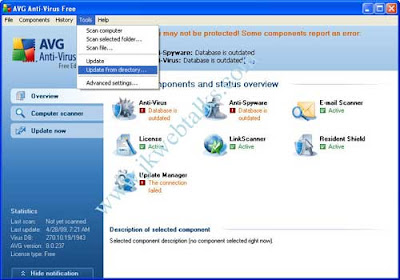
Now open your AVG User Interface. In the menu bar, choose Tools > Update from directory to update AVG antivirus offline (see image)
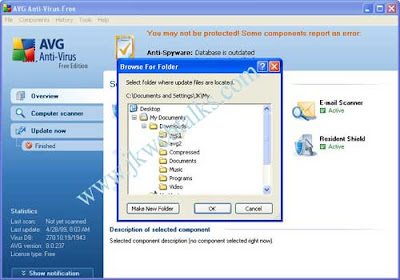
A new window pops up (see image).
Choose the folder (avgupdate) where the virus definitions are copied. Click OK.
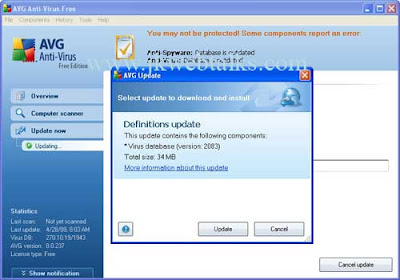
A new window pops up (see image). Click on 'Update'
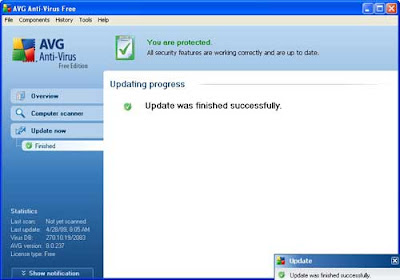
AVG will update its virus database offline using this file.(see image)

read more "How to update AVG antivirus offline?"

Get serial key n patches.


If u r a regular user of large amount of software then this post is really going to help you.
we use a large amount of software but there are software are for trial version  and after some time asking for key or online registration.
even i face this kind of problem when i am using tvc but after some time its time over and asking for key...
so this force me to find somethingh  which solve my problem so i find list of some websites where u can find crack,key for large amount of software....

here is a list of some websites where u find this


  1. keygenguru
  2. serialkey
  3. zcrack
  4. serials
  5. subserials
  6. cracksearchengine
  7. crackfind
  8. serials
  9. crackfound
  10. serialkey
  11. youserials
  12. crackserialcodes
  13. keygens
  14. bestserials
  15. cracks
i hope this will going to help u . if u find or know any another good website or having any problem then contact me.comments are allowed .
i hope u will enjoy this post
read more "Get serial key n patches."

Reveal the passwords behind ****

Ever wanted to know what is behind those ************{password} in any application.for example if you want see and know a password in your yahoo messenger that somebody else have typed and left it or in any other application.
Here is how you do it…
just download Spine pass view 07 from this url
Simply drag the hand over the *** in a text box to reveal the password! Simple, small, quick and free.
CATCH 1:-when you start this application the asterisk writing capability of your system is disabled.
CATCH 2:-some anti virus softwares consider this software as a virus and delete it as soon as loaded so if you want this thing to work then disable your anti virus for sometime.
Note:Use it carefully, disabling the anti virus is not safe.
read more "Reveal the passwords behind ****"

Kaspersky Internet Security 2010

23svij5 Kaspersky Internet Security 2010

Fully Automated Real-Time Protection

Kaspersky Internet Security stops your PC being slowed down by cybercriminals and delivers unsurpassed on-line safety whilst protecting your files, music and photos from hackers:

* Keeps your money and identity safe Improved!
* Protects against bank account fraud
* Safeguards against online shopping threats
* Cybercriminals won’t hi-jack your PC
* Family protection from on-line predators
* Your files won’t be ruined by hackers Improved!
* Keeps your PC running smoothly
* Safer Wi-Fi connections
* Two way personal firewall

New And Improved Features

Kaspersky Internet Security 2010 offers a number of new and improved features together with unique protection technologies to address the latest online threats, keep your PC running smoothly and customize protection according to your activities:

* Unique Safe Run Mode for questionable applications and websites New!
* Security Application Monitor to give you full picture on programs installed on your PC Improved!
* Identity Information Controller to give valuable data an extra layer of protection Improved!
* Kaspersky Toolbar for Internet browsers to warn you about infected or unsafe websites New!
* Advanced identity theft protection, including improved secure Virtual Keyboard Improved!
* Urgent Detection System to stop fast emerging threats Improved!
* Next generation proactive protection from zero-day attacks and unknown threats Improved!
* Special Game Mode to suspend alerts, updates and scans while you play New!

Advanced Features For Better Protection

Kaspersky Internet Security 2010 has a range of unique tools for heightened security. Protecting your family and keeping your PC healthy:

* Run questionable applications and websites in Safe Run Mode New!
* Enter logins and passwords using secure Virtual Keyboard Improved!
* Enable Parental Control for added child safety online
* Turn on Game Mode to suspend alerts, updates and scans New!
* Add folders and files with valuable data to the protected area Improved!
* Scan system and installed applications for vulnerabilities
* View applications working on your PC and customize their rules
* Tune up your OS and Internet browser settings for better security
* Restore correct system settings after malware removal
* Burn a Rescue CD to restore your system in case of infection Improved!
* Remove activity traces in your Internet browser (history, cookies, etc.)

Get Protection From A Range Of Threats


Award-winning technologies in Kaspersky Internet Security 2010 protect you from cybercrime and a wide range of IT threats:

* Viruses, Trojans, worms and other malware, spyware and adware
* Rootkits, bootkits and other complex threats
* Identity theft by keyloggers, screen capture malware or phishing scams
* Botnets and various illegal methods of taking control of your PC
* Zero-day attacks, new fast emerging and unknown threats
* Drive-by download infections, network attacks and intrusions
* Unwanted, offensive web content and spam

System Requirements

Required for all installations:

* 300 MB free space on the hard drive (the exact number is based on antivirus database size)
* CD-ROM (for installation of the program from CD)
* Computer mouse
* Internet connection (for product activation)
* Microsoft Internet Explorer 6 or higher (for downloading updates)
* Microsoft Windows Installer 2.0 or higher

Operating Systems

* Microsoft Windows XP, all editions (Service Pack 2 and higher)
* Microsoft Windows Vista, all editions (32/64 bit)

Hardware Requirements

* Intel Pentium 300 MHz or higher (or equivalent)
* 256 MB available RAM
* Intel Pentium 800 MHz 32 bit (x86) / 64 bit (x64) or higher (or equivalent)
* 512 MB available RAM


read more "Kaspersky Internet Security 2010"

How delete a zero (0) byte file from computer/pc/windows xp/vista


Now a days many of the internet users suffering from a zero byte (0) file problem.The file can't be deleted by any software, not can be renamed ,neither can be moved from one drive to another and also can't be replaced by same name file.Some people also use dos prompt to delete that zero byte file but it can't be deleted.

In most case it happens from downloading a torrent file.when we save the file the file save but it can't have any byte i.e having zero byte file and then problem start to delete that file.

I also face this problem then i found a intresting software and this software is "FREEWARE" and 200 % working.

"Unlocker" (SOFTWARE NAME) is ultimate software that help to delete zero byte file. you can download the "Unlocker" by visting the below website and also see how it works?

"Unlocker" is the only software that can only be used to delete the zero byte files.

http://ccollomb.free.fr/unlocker/


  • Ever had such an annoying message given by Windows?


  • It has many other flavors:

    Cannot delete file: Access is denied
    There has been a sharing violation.
    The source or destination file may be in use.
    The file is in use by another program or user.
    Make sure the disk is not full or write-protected and that the file is not currently in use.


  • Unlocker is the solution!


    • 1. Simply right click the folder or file and select Unlocker


      2. If the folder or file is locked, a window listing of lockers will appear


      3. Simply click Unlock All and you are done!
    read more "How delete a zero (0) byte file from computer/pc/windows xp/vista"

    Editing YouTube videos for the iPod using a conversion tool


    buy avs Video Converter
    There are many interesting videos on
    YouTube—a good pastime when you
    have to commute every day. However,
    the Flash contents of the YouTube
    website cannot be loaded onto an iPod
    without some knowhow.


    You will have to download the Flash
    videos and convert them into a file format
    supported by the iPod. The free YouTube
    to iPod Converter program undertakes this
    task; it is available here
    . Always use the
    latest version (currently 3.1), because
    older versions do not sometimes function
    properly with YouTube due to possible
    format changes. You can start the program
    directly after the installation..
    Now search for a video on the
    YouTube site using your browser. Copy
    the web address from the address line
    of the browser using [Ctrl]+[C], go to the
    converter and click in the input field for the
    URL. Paste the address with [Ctrl]+[V]. In
    the “Raw file” field, change the file name
    suggested to the one you want. Change
    the “Drive” setting to “Apple iPod”. Then
    select the setting suitable for your iPod
    model under “Configure". Click “Download
    and convert”. Wait till the process is
    complete. You can now transfer the
    generated MP4 file to your iPod.

    to download YouTube to iPod Converter
    read more "Editing YouTube videos for the iPod using a conversion tool"
     
    Go to Top